Built in Collections in Go
Built in means those collections which are part of the go language syntax.
Array, Slice
| Array (FIXED SIZE) | Slice (DYNAMIC) | |
|---|---|---|
| Declaration (Identify with number in []) |
|
|
1. Array [n]T
Creating Array |
Array passed to function is "PASS BY VALUE" |
fixed-size collection of elements of the same type. Array cannot be resized
2. Slices [] = C++20(std::span) = Rust(Slice (written as &[T]))
Slice is a JUST a POINTER pointing to array.
Slice has 3 components
1. Pointer(to underlying array)
2. Length(number of elements in slice). len(slice)
3. Capacity(maximum number of elements it can hold). cap(slice): length
of undelying array - 1
┌───────────────────────┐
│ Pointer (ptr)  ───────┼───────┐
│ Length (len): 3       │       │
│ Capacity (cap): 3     │       │
└───────────────────────┘       │
                                v
                          Backing Array
                  ┌─────────┬─────────┬─────────┐
                  │    1    │    2    │    3    │
                  └─────────┴─────────┴─────────┘
nil slice: slice which does not point to any array(at present),
but can in future.
Can Slice increase the size of underlying array? No
|
Create Slice From Array Slice from Slice Empty Slice |
UNDERSTAND, Will Clear all Slice Questions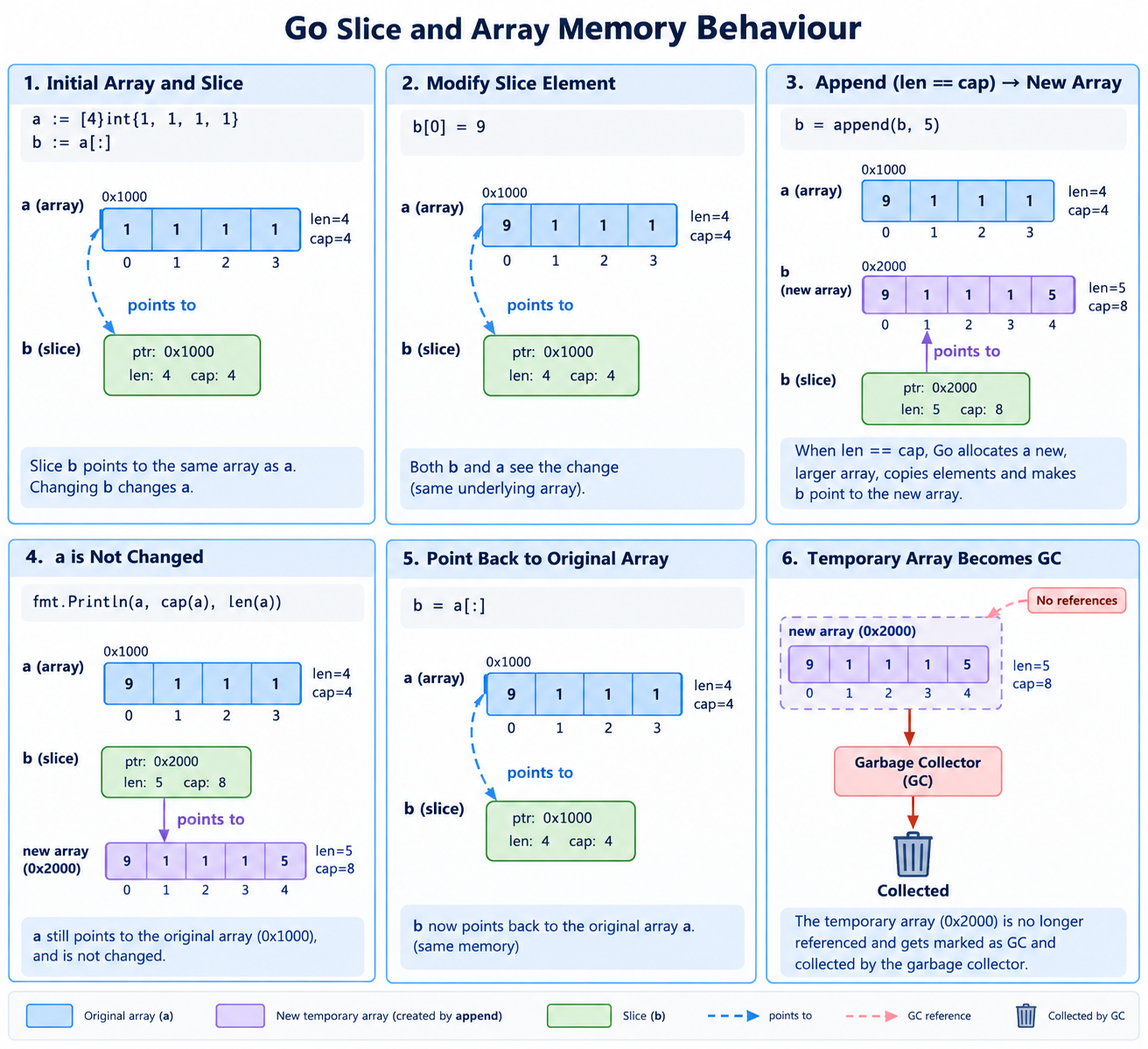
|
Slice Functions
-
append()
- append() will append the value to slice
- append only modifies the original underlying array if the slice's len is less than its cap. If len == cap, a new array is allocated.
package main
import "fmt"
func fun(b *[]int) {
  // Trying adding beyond capacity
  *b = append(*b, 5)        //2,3,4,5
}
func main() {

    // Create Slice
    a := [4]int{1, 2, 3, 4}
    fmt.Println("Before a:", a)   //1,2,3,4

    // Copy Slice
    b := a[1:4]                   //2,3,4

    fun(&b)
    fmt.Println("After a:", a)    //1,2,3,4. a remains same
    fmt.Println("b:", b)          //2,3,4,5
}
// Solution: Take array of size [5]
- nil slice, Create slice using make(), 2D Slice
func main() {
  names := [4]string{"John", "Paul", "George", "Ringo"}

  // Slice
  a := names[1:3]   // [Paul George]
  a[0] = "XXX"      // a=[XXX, George], names=[John Paul XXX George]
  fmt.Printf("%d %d\n", len(a), cap(a))   //len=2, cap=3(underlying array size - 1)

  // nil Slice
  var b[]string
  len(b), cap(b)      // 0, 0
  b = names[1:3]      // b=["XXX", "George"]

  // create Slice using make()
  // c := make([]T, len, cap)  OR c := make([]T, len)
  d := make([]string, 3)  //len=3
  c := make([]string, 0, 2) //len=0,cap=2. Allocates memory of size=2 & points c to it.
  c = names[2:4]            // c=["George", "Ringo"]

  // append slice
  append(c, "Ram")

  /***************** 2D Slice ******************/
  // Method-1
  var test [][]int
  for i := 0; i < rows; i++ {
      test = append(test, make([]int, cols))
  }

  // Method-2
  test := make([][]int, rows)
  for i := range vector {
      test[i] = make([]int, cols)
  }
  /*******************************************/

  // Create hashmap using make()
  m := make(map[int]int)
}
3. Channels
4. Maps
-
A map is a hash table.
Maps in C++
Syntax: make(map[KeyType]ValueType, initialCapacity)

m := make(map[string]any)   //map[key]value
m["gold"] = 100
m["told"] = "b"

m1 := map[string]bool{}     // Init map to empty
Standard Library Provided Collections
1. Queue(Implemented using slice)
package main
import "fmt"
type test struct {		//Declare a struct having slice which will act as queue
    q []int
}
func Constructor() test {
    return test{}
}
func (this *test) Push(x int)  {
    this.q = append(this.q, x)		//Push() append x to queue
}
func (this *MyStack) Pop() {
    this.q = this.q[1:]   		//Pop() Remove 1st element
}
func (this *MyStack) Top() int {
    return this.q[0]			//Top()
}
func (this *MyStack) Empty() bool {	//Size()
    if len(this.q) == 0 {
        return true
    }
    return false
}
2. Stack using slice
3. struct
struct as class
-
Class is defined as struct type. Example: Person is defined of type
struct.
The struct type can be considered similar to a class, as it allows you to define fields and associated methods.
package main
import "fmt"

type student struct {		// Define a struct type
    name string
    age  int
    marks []int		// slice = dynamic ints
    misc []interface{}	// misc is a slice that can hold values of any type
}

// Define a method associated with the Person struct
// To associate a method with a struct, define a method with a receiver type that matches the struct type.
func (p Person) SayHello() {
    fmt.Printf("Hello, my name is %s and I am %d years old.\n", p.name, p.age)
}

func main() {
    // Create a new instance of Person
    person := Person{name: "John", age: 30}

    // Call the SayHello method
    person.SayHello()
}
struct tagging
-
Defines variable name, type and field name which will map in yaml/json
file
test.yaml
default_action: allow
rules:
  - user: "anonymous"
    domain: "*.internal.example.com"
    action: block

type Config struct {
//Field Name    DataType  StructTag: metadata. Look into yaml file when you find
                          default_action put into DefaultAction
	DefaultAction string    `yaml:"default_action"`
	Rules         []Rule `yaml:"rules"`
}

var cfg Config
bytes := os.ReadFile("test.yaml")   //Read test.yaml content as bytes
yaml.Unmarshal(bytes, &cfg)         //Stored bytes into Config struct