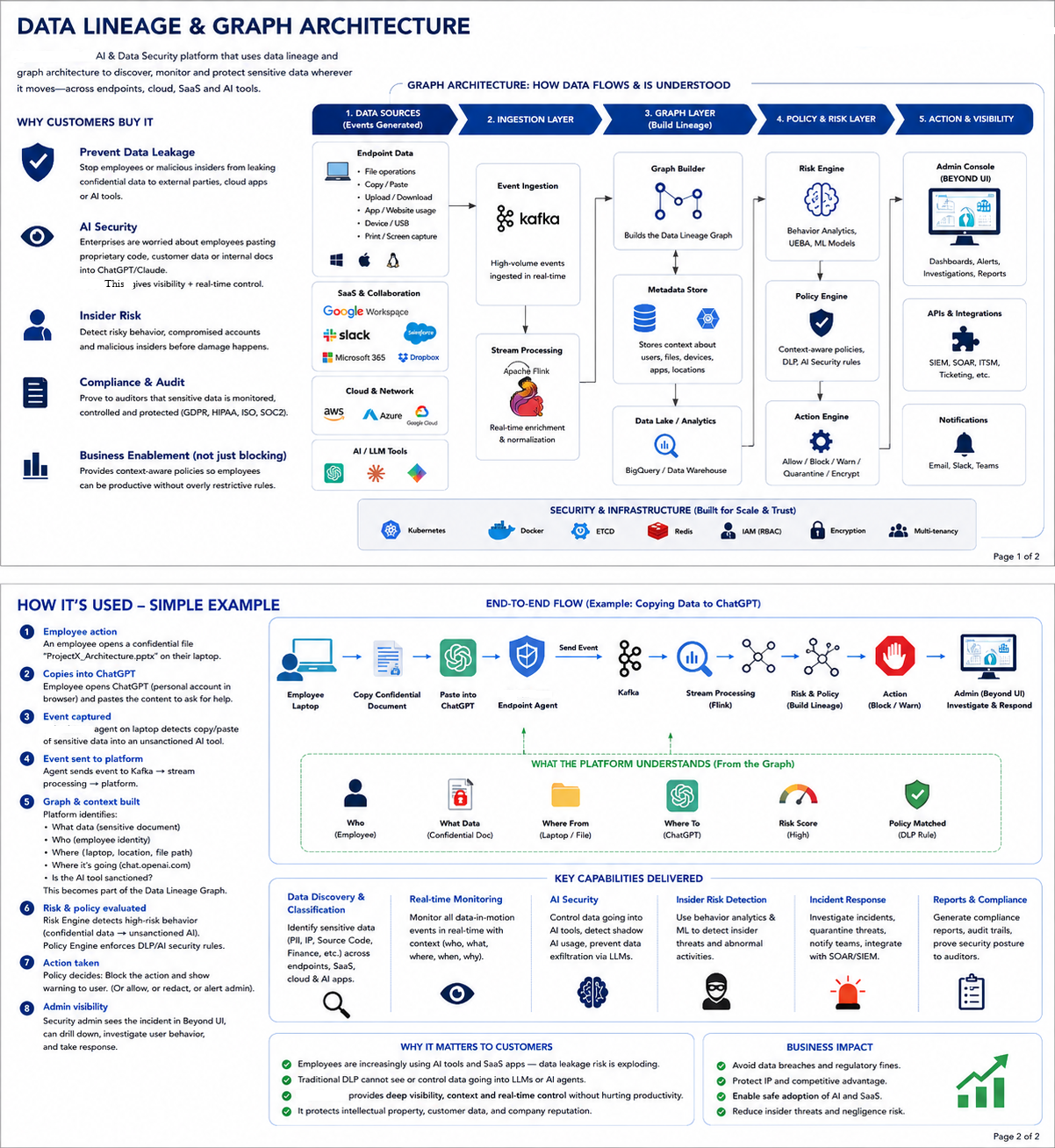
Data Lineage Policy enforcement
Lineage: the series of families that somebody comes from
originally
Every activity is sent by Windows Agent to Cloud, so that inspection can
be done
Policy enforcement and lineage Graph will constructed using every
activity.
How cyberhaven Laptop client captures the events
Kernel-level drivers, Browser extensions/hooks, System API
| OS | Event | How |
|---|---|---|
| Windows | File uploaded on Chrome | Brower extensions |
| Windows | FTP sending file |
Agent hooks into network socket operations WFP - Windows Filtering Platform, Minifilter drivers |
| Linux | FTP sending file | Linux Netfilter/eBPF ((Extended Berkeley Packet Filter) and kernel modules to monitor system calls, file access, and socket activity seamlessly without destabilizing the kernel) |
What telemetry data Need to be sent?
user is uploading file to box.com after download from github.com
{
  "source": "github.com"                                    //Where did the data come from?
  "action": "Copy/Paste/Print/Network Upload"               //What is happening to the data?
  "actor":  "Userid/ProcessName/path/device state/time"     //Who is doing it?
  "destination": "box.com/FTP/USB drive"                    //Where is it going?
  "classification": "code/financial record"                 //What is inside the data?
}
HLD
1. Tenant creates policy, which flows to Windows agent. Policy might
have default rules. Cyberhaven agent starts with policy AST
2. User downloads test.cpp from github.com. The endpoint agent tags this
file in the local data lineage store, recording its provenance (origin:
GitHub, classification: source code).
3. User attempts to upload test.cpp to box.com
4. Cyberhaven agent intercepts the network using OS primitives (like WFP
on Windows or browser hooks).
5. Agent checks the action against its cached, pre-fetched LocalPolicy
tree without making a synchronous cloud call.
6. Local policy engine returns an immediate allow or deny decision.
7. Telemetry Ingestion: Audit log, Alert is periodically or immediately
transmitted for event processing and analytics.
sequenceDiagram
    autonumber

    box Device (Endpoint)
    actor User as Employee / Browser
    participant Agent as Cyberhaven Agent
(WFP / Hooks)
    participant Policy@{ "type" : "boundary" } as Local Policy Tree
    end

    box rgb(255, 245, 238) External Services
    participant GH as GitHub.com
    participant Web as Box.com
    end

    box rgb(240, 248, 240) Cloud Backend
    participant PE@{ "type" : "control" } as PolicyEngine
    participant LB@{ "type" : "control" } as Load Balancer (LB)
    participant Kafka@{ "type" : "queue" } as Kafka / Ingestion
    participant Proc@{ "type" : "control" } as Event Processing
    end

    PE ->> Agent: policy.json
    Agent ->> Policy: Create local AST
policy tree
    User->>GH: Download test.cpp
    Note over Agent: Event Noted
    GH-->>User: File downloaded

    User ->> Web: upload test.cpp
    Note over Agent: Event Noted
    Agent->>Policy: Query local rules for action
    Policy-->>Agent: Deny
    Agent->>User: Block

    Note over Agent, Proc: 3. Asynchronous Telemetry Pipeline
    Agent->>LB: Send event metadata / incident snapshot
    LB->>Kafka: Push event stream
    Kafka->>Proc: Process logs for
global lineage graph
& analytics
Policy decisions are taken locally by cyberhaven client
Windows Agent pre-fetched policy rules from cloud, hence at start Policy
tree is present on agent.
These are baseline threat intelligence(default) + tenant specific
rules(defined by tenant).
Tenant Admin(Policy UI)
     |
     | DLP Rules(Default) +
     | Tenant write his own rule
     v
Policy engine
     |
     |policy.json
     v
Cyberhaven Endpoint Agent
  [Create its AST]
Allow/Deny Runtime
Data sent to cloud for Creating Lineage graph
Not everything is sent to cloud. Data is sent in batches.
For example: policy violations are sent