Apache Kafka — Distributed Messaging System
Kafka is an open-source
Distributed Message Storage platform.
Producers append records to topics; consumers read them
in order.
Unlike a simple message queue that deletes messages When 1 reader
reads the message, Kafka
stores Topics(msg1,msg2..) on disk for a configurable time or
size — so that consumer can replay a history.
Decouples services at very high throughput, ie Fast producer, slow
consumer can be tied to the system.
Requirements
Non Functional
High throughput: Ingest millions of events/sec from many
producers without a single bottleneck.
Scalability: Add brokers and partitions horizontally as traffic
grows.
Fault tolerance: Survive broker/disk/network failures without
losing committed data.
High availability: Keep serving reads/writes when nodes fail
(leader election, replicas).
Durability
Persist messages to disk; survive process restarts and crashes.
Ordering
Preserve order within a partition (global order only if single
partition).
Decoupling
Producers and consumers evolve independently; no direct coupling.
Replay
New or slow consumers can re-read history from a stored log.
Multi-subscriber
Many consumer groups read the same topic independently.
Backpressure & retention
Buffer spikes; drop or compact old data by policy, not by accident.
Where Kafka Use Cases
Good Fit
Event streaming / log aggregation — app logs, metrics,
clickstreams into data lakes.
Microservice decoupling — order placed, payment captured,
inventory updated as events.
Change data capture (CDC) — database changes streamed to search
indexes or warehouses.
Real-time analytics — Flink/Spark/Kafka Streams processing
pipelines.
Replay & reprocessing — rebuild a downstream system from
the log after a bug fix.
High-volume pub/sub — many services subscribe to the same topic
with separate consumer groups.
Poor fit:
Low-latency RPC — use gRPC/HTTP directly; Kafka adds ms–s
latency and batching trade-offs.
Task queues with per-message ack delete — SQS/RabbitMQ
patterns; Kafka is a log, not a mailbox.
Small messages, few TPS, simple setup — operational overhead of
a cluster may be overkill.
Strict global ordering — only one partition gives global order;
multi-partition = per-key or partition order.
Architecture
Cluster of brokers, topics split into partitions, and a special
__consumer_offsets topic
Only 1 Topic can be stored in 1 Partition & A topic is spread across
many partitions.
Reliable:
Records/messages(immutable) are appended to a disk and
are strictly ordered. Each record gets a monotonic offset (0, 1, 2, …)
unique within that partition.
Consumers track committed offsets so restart continues from
last safe position.
To locate a record you need topic + partition + offset.
Scalable: More nodes/paritions/disks can be added. Producers
can batch and compress record
Fault tolerant: Each partition is replicated across brokers
(replication factor rf). If a leader fails, a follower from the ISR is
elected. Cluster continues serving as long as leaders exist for
partitions
Each partition has one leader broker and zero or more
follower replicas on other brokers.
struct Message/Payload {
  name
  age
  empId
}
┬────────────────────────────────────────  Kafka Cluser  ──────────────────────────────────────────────────────────┐
|                                                                                                                  |
|   ┬───────────────────────── BROKER-2(master) ────────────────────────────────────┐   ┬─ Broker1(master)──┐      |
|   | ┬────────────────── Partition-1   ────────────────────┐                       |   |                   |      |
|   | | ┬───────────── topic = Employee ──────────────┐     |                       |   ┴───────────────────┴      |
|   | | | msg1->msg2->msg5    msg6->msg9->msg7        |     |                       |                              |
|   | | ┴─────────────────────────────────────────────┴     |                       |                              |
|   | ┴─────────────────────────────────────────────────────┴                       |                              |
|   |                                                                               |                              |
|   |                       ┬────────────────── Partition-2 ────────────────────┐   |                              |
|   |                       | ┬───────────── topic = Orders ─────────────────┐  |   |                              |
|   |                       | | m1 m2 m3 ....                                |  |   |                              |
|   |                       | ┴──────────────────────────────────────────────┴  |   |                              |
|   |                       ┴───────────────────────────────────────────────────┴   |                              |
|   |                                                                               |                              |
|   |              ┬───────────────────────── Partition-n ────────────────────────┐ |                              |
|   |              | ┬───────────────topic = __consumer_offset ────────────────┐  | |                              |
|   |              | |  Consumer_Name  ID    Topic   Committed_Offset  State   |  | |                              |
|   |              | |  Consumer-1     uid1  Orders  Read till ms7     Alive   |  | |                              |
|   |              | |  Consumer-2     uid1  Orders  Read till ms7     Alive   |  | |                              |
|   |              | ┴─────────────────────────────────────────────────────────┴  | |                              |
|   |              ┴──────────────────────────────────────────────────────────────┴ |                              |
|   ┴───────────────────────────────────────────────────────────────────────────────┴                              |
|                                                                                                                  |
┴──────────────────────────────────────────────────────────────────────────────────────────────────────────────────┴
Read & Write paths
|
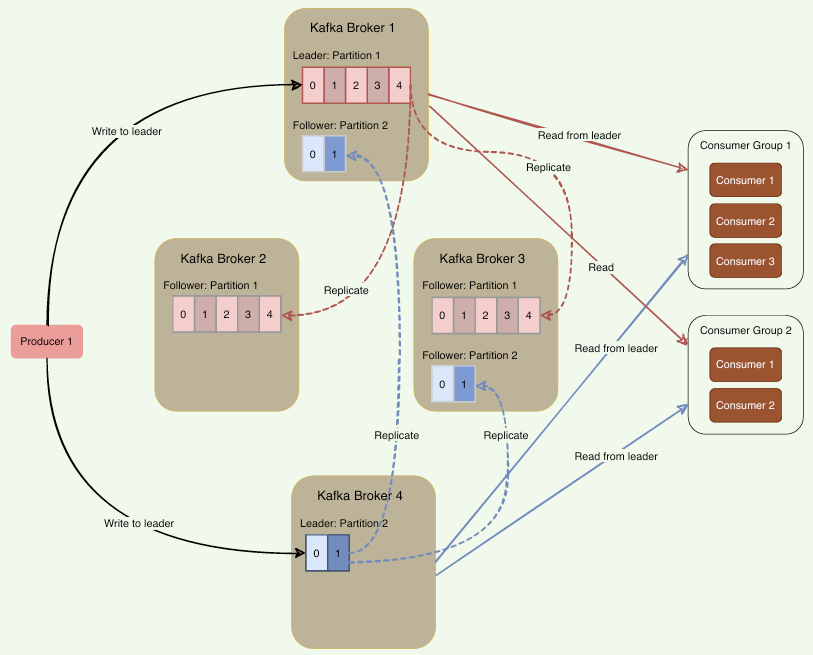
Write path: Producers Always write to the partition leader.
Followers pull from leader via replication. Read Path: Consumers Always fetch from the partition leader. Metadata: clients bootstrap from any broker ( bootstrap.servers), then use the cluster metadata
API to find partition leaders (not by calling ZooKeeper directly
in modern clients). Leader, follower, and ISR For each partition replica set, one broker is the leader — all producer writes and consumer reads go to the leader (by default). Followers replicate the log tail from the leader. ISR (In-Sync Replicas) is the set of followers caught up within a configurable lag. Only ISR members are eligible to become leader on failover. A leader is always in its own ISR. |
Core concepts
Records, messages, and offsets
A record (message) is typically a
(key, value, timestamp, headers) byte sequence. Records
in a partition are immutable and strictly ordered.
Each record gets a monotonic offset (0, 1, 2, …)
unique within that partition. To locate a record you need
topic + partition + offset. The
key is optional; same key → same partition (hash)
preserves order per key.
Topics
A topic is a named stream of records (e.g.
orders, payments). Topics are split into
partitions for scale.
Partitions and Replicas
Partitions
What? Single topic can receive millions of messages per second, Kafka splits that topic into smaller, parallel segments called partitions. These partitions are stored on different non-overlapping broker/shards for scalability.
Partition Id
Let us consider a scenario where 1000 routers are sending syslogs
messages to collector. In a day around 1TB of data is sent by routers
to collector.
Now to store information on Kafka, Collector becomes kafka Producer &
hence need to calculate the partition key, which determines on which
partition the log message should be sent.
How parititon Key/partition ID should be decided?
Golden rule is Design your partition key backwards from your
consumers.
Example here, collector uses the router's IP (or ID) as the
message key. All logs from Router 1 go to Partition 0, Router 2 to
Partition 1, etc.
Calculating the Partition ID:
The Collector parses the log and extracts fields like source_ip
(192.168.1.1), destination_ip, size, etc.
The Collector then explicitly chooses a Kafka Message Key (for
example, it sets the message key to Router 1's IP).
Kafka producer library will run hash function on the message
key (hash("192.168.1.1") % total_partitions) = 2.
Collector sends the message to Kafka along with the Key, and
Kafka's broker looks at the key and appends the message to the
partition.
 partitionKey = hash("src_ip recieved in pkt") % total_partitions

router1 ----[srcip,dstip,pkt]-----\                                       |-- Kafka Broker ------|
                                   \                                      | Topic(router-logs)   |----> Insync replica ISR(Leader) ----> Replica1(Follower)
router2 -----[srcip,dstip,pkt]-------> Collector(kafka Producer) ------>  |partition-1(msg1,msg3)|
                                   /                           msg,partId |                      |
router-n ----[srcip,dstip,pkt]----/                                       |partition-3(msg2)     |
                                                                          |----------------------|
Reading from Partition
Messages are never duplicated on Partitions.
Now messages from partitions are read by consumers using
consumer groups
Replicas
Replicas are copies of the same partition, spread across different
brokers, purely for fault tolerance.
"partition 0" itself might have 3 replicas (1 leader + 2 followers)
Brokers and cluster
A broker is a Kafka server (default port
9092) that stores partitions on local disk. A
cluster is multiple brokers. Kafka is multi-master at
the cluster level — any broker can host leaders for different
partitions.
Bootstrap broker(s): first address clients connect
to; broker returns full metadata (all brokers, topics, partition
leaders).
Consumer group
A consumer group is (set of consumers = pods of same service) that
work together to read 1 topic.
(1 consumer = 1 pod) is given responsiblity to read some messages from
topic, while other consumer will read rest of messages
2 consumers will never read same message from topic helps to avoid
duplicate work.
Example
- Conside a Topic(Employee) has 2 partitions, receiving a continuous
stream of employee-update events
- Partition 0 has 2 messages(msg1,msg2) and Partition 1 has 1
message(msg3)
- 3 seperate microservices want to read all messages from
topic=Employee.
|
- All pods of 1 microservice will be in same consumer group - 3 microservices will be in seperate consumer group
How Kafka enforce the guarantee (2 consumers will not read same message)? Each consumer group tracks its own committed offset per partition using topic = __consumer_offsets. If a consumer dies,
its partitions are rebalanced to surviving
members.
|
High-water mark (HWM)
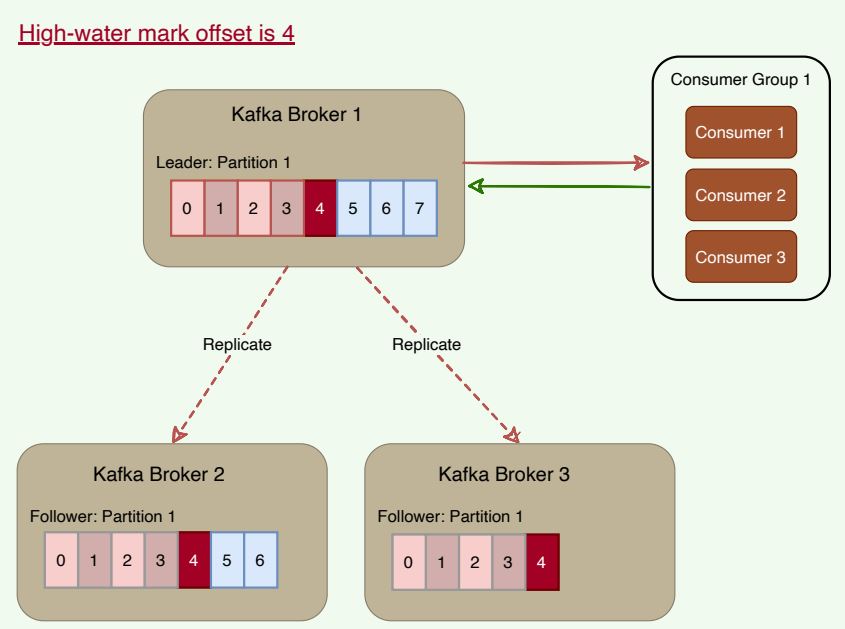
When consumer/subscriber reads from Leader. Leader never returns
messages which have not been replicated to a minimum set of ISRs.
Leader keeps track of highest water mark. Highest watermark is the
offset for that partition replication.
Example(in figure below): Leader does not return messages greater than
offset=4, as it is the highest offset message that has been replicated
to all followers.
Workflow — one message publish and consume
sequenceDiagram
    autonumber
    participant P as Producer
    participant B as Any Broker
(bootstrap)
    participant L as Partition Leader
Broker 2
    participant F as Follower
Broker 1
    participant C as Consumer
Group A
    participant O as __consumer_offsets

    P->>B: Metadata request — where is topic orders partition 1?
    B-->>P: Leader = Broker 2

    P->>L: Produce record (key=orderId, value=JSON)
    L->>L: Append to local log segment on disk
    L->>F: Replicate to follower ISR
    F-->>L: ACK replication
    L-->>P: ACK (acks=all)

    C->>L: Fetch records from offset 42
    L-->>C: Batch of records (up to HWM)
    C->>C: Process business logic
    C->>O: Commit offset 43
Role of ZooKeeper (and KRaft)
Classic Kafka (with ZooKeeper): ZooKeeper stores cluster metadata — broker registration, topic configuration, partition leader election, controller identity, and ACLs (in older setups). Brokers and the controller watch ZK for changes. Clients do not query ZooKeeper for leaders; they use the Kafka metadata protocol via brokers.
Modern Kafka (KRaft mode, ZooKeeper-less): metadata is stored
in an internal Raft quorum (__cluster_metadata). New
deployments should plan for KRaft; ZK is deprecated in Kafka 3.x+ and
removed in Kafka 4.x. Conceptually the controller still tracks
leaders, ISR, and broker membership — the storage layer changed.
Storing messages on disk, log retention, and client quotas
Log segments on disk
Each partition is a directory of segment files (e.g.
00000000000000000000.log). Appends are sequential — fast
on HDD/SSD. An index maps offset → file position for
fast lookup. Segments are rolled by size (segment.bytes)
or time. This design is why Kafka handles very large volumes: it
behaves like a distributed commit log, not an in-memory queue.
Log retention
Old data is removed by policy — not when a consumer reads it:
retention.ms — delete segments older than N milliseconds
(default 7 days).
retention.bytes — cap total size per partition.
Compacted topics
(cleanup.policy=compact) — keep latest record per key
(changelog topics, Kafka Streams state). Tune retention for compliance
(keep 90 days) vs cost (short TTL for high-volume telemetry).
Client quotas
Quotas throttle misbehaving clients so one tenant
cannot saturate the cluster. Kafka supports producer/consumer
byte-rate limits per client ID or
user/principal (quota.producer.default,
quota.consumer.default). Exceeding quota returns throttle
time in responses. Use quotas in multi-tenant platforms and shared
clusters.
Message delivery semantics
| Semantics | Meaning | Typical setup |
|---|---|---|
| At-most-once | Message may be lost; never duplicated. |
Producer acks=0; consumer commits offset before
processing.
|
| At-least-once | No loss if committed; duplicates possible on retry. |
Producer retries + acks=1/all; consumer commits after
processing (idempotent handler).
|
| Exactly-once (EOS) | Each record processed once end-to-end (within Kafka Streams / transactional producer). |
Idempotent producer + transactions +
read_committed consumers.
|
Dead letter queue (DLQ)
DLQ is a topic on which consumer has to write error messages
When a topic arrives at consumer, and it finds a unrecoverable error
in message.
It catches the exception and explicitly produces (writes) that failed
message into the DLQ topic.
It then commits the offset of the original message so it can continue
consuming newer messages.
Kafka Broker Dead
Producer Actionables
1. Producer should send messages after retry timer
2. Discover new leader as it comes from ISR